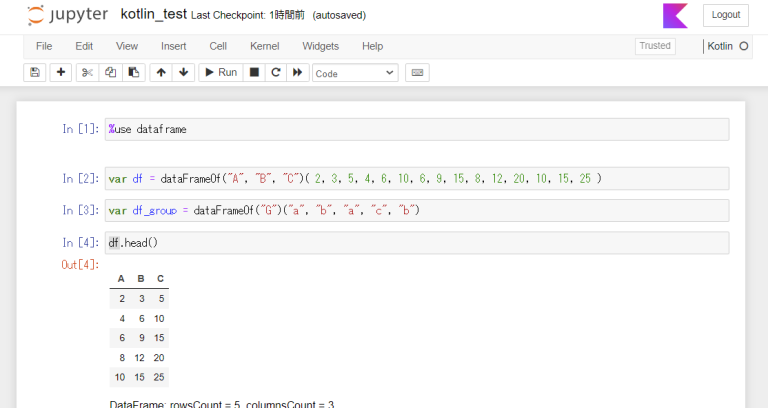
Last month, I started developing an Android app in Kotlin. Part of the job involves porting Python pandas code to Kotlin DataFrame, and I’ve been doing that work in Jupyter Notebook.
I already use Jupyter Notebook for pandas, and there’s a Kotlin kernel for it too. That lets me compare the pandas and Kotlin DataFrame versions as I work through the port.
Slow and Sometimes Unstable
The problem is that it’s really slow. Even simple operations can take a while. I suppose that’s to be expected when you’re trying to use a compiled language in an interactive environment, but it’s still frustrating.
Another issue, which I’ve sometimes seen with the Python kernel too, is that after an error, cells will often stop showing any output when I run them.
I suspect the kernel dies when the error occurs. Once that happens, nothing works until I restart it, which is a bit disappointing.
Still Great for Learning Kotlin
I’ve been complaining, but if you normally use Python (or, like me, Python is the only language you know) and you’re trying to learn Kotlin while figuring out how to implement something, this is incredibly useful.
Even if you don’t use Python and don’t already have a Jupyter Notebook environment, I think it’s worth installing Python and Jupyter Notebook on your computer if you want to learn Kotlin.
To install the Kotlin kernel, run this command in a terminal:
pip install kotlin-jupyter-kernelWhen I originally wrote this, I thought you might not even need a Java SDK. Check the Kotlin Jupyter project’s installation instructions for the current setup requirements, including its JDK configuration.
So, Kotlin in Jupyter Notebook can be unstable, but for a beginner like me, it’s a huge help.
Until next time.


Comments