Somehow, I have become the odd person who calls himself “anti-AI” while leading AI projects both inside and outside my company. Somewhere along the way, this blog also turned into a place where I mostly complain about AI.
So, for a change, I thought I would write something positive about a tool I have actually been enjoying: ChatGPT Sites, a generative AI tool for low-code development—or something along those lines.
My first impression? An incredibly fun way to build weekend projects, with deployment and operations taken care of through the same conversation.
But does that mean you can use it for work?
I spent about three hours building three websites to get a feel for what it can do. They are publicly accessible, so you can try them yourself.
This article reflects my experience and the information available to me as of October 28, 2026. Features and service terms may change.
- The Appeal: Building and Deploying an App Through Conversation
- Before You Try the Demos
- 1. An HTTP Response Testing Tool
- 2. An Internal Survey Site, Along the Lines of Google Forms
- 3. A WordPress-Style Blog
- So, Can You Use It for Business?
- Where I Would Consider Using It
- Would I Enable It Across My Company?
- Where This Kind of Tool Might Go Next
The Appeal: Building and Deploying an App Through Conversation
Building a web app with a handful of screens using a coding agent is no longer particularly surprising to me. Tools such as Codex and GitHub Copilot are already part of my everyday development work.
What makes ChatGPT Sites interesting is how much of the surrounding work you can handle entirely through the ChatGPT conversation: database management, OAuth authentication setup, testing, deployment, custom domains, and all those little UI adjustments.
It feels like being freed from the tedious parts of development so you can focus on what you actually want to build—using natural language, without necessarily writing the code yourself.
One disappointment is that you cannot directly edit the code in real time within the interface. Still, if you treat it as a fully low-code tool and keep your project small enough for the AI to understand and manage, the development experience is simple and remarkably painless.
Knowing when to accept “this tool just cannot do that” is part of the deal.
Before You Try the Demos
These are demonstration sites, and their authentication and permissions are deliberately permissive.
Two of them have a demo login button that lets you explore the administration screens without registering an account. The demo account can edit some things, too. Please do not abuse it.
For a real business application, authentication, permissions, and security would need much more serious attention.
ChatGPT Sites can use ChatGPT sign-in, so restricting access to members of your workspace seems like a sensible starting point for an internal app. That alone, however, does not establish that the application is secure. It also appears possible to integrate other authentication systems used by an organization, but I would approach that carefully.
You can inspect the generated code to some extent. Even so, how much confidence you can have in the application’s security is my biggest concern about using it for work.
With that in mind, here are the three sites.
1. An HTTP Response Testing Tool
There are already plenty of services that return predefined HTTP responses for testing. I had avoided using them because I was uneasy about sending requests from a work environment to an outside service. This seemed like a good opportunity to build my own.
It was the first site I created, and the speed at which it went live immediately made me think: “Okay, this is fun.”
For a small utility like this, ChatGPT Sites feels more than capable. It does not need user authentication, and its intended purpose does not require sensitive information. This is the sort of thing I would happily keep building.
Choose an HTTP status code and a request method, and the site generates a curl command. Run that command in the environment you want to test, and you get the response you requested.
For example, you can use it to check how your application handles an HTTP 503 response—the status code for “Service Unavailable.”
It also generates sample test code for Python and Java.
To help you find your requests in the web interface afterward, the tool records only the last four digits of the IP address. You can use those digits to filter the request log.
This is a simple way to locate test results, rather than a reliable way to uniquely identify a user.
2. An Internal Survey Site, Along the Lines of Google Forms
When I first joined my company, I spent three months building a survey website as part of our new employee training program.
For this experiment, I entered the requirements from that project and asked ChatGPT Sites to build it.
The site I had struggled with for three months was built and deployed in about an hour. I have slightly mixed feelings about that.
You can sign in with the demo account.
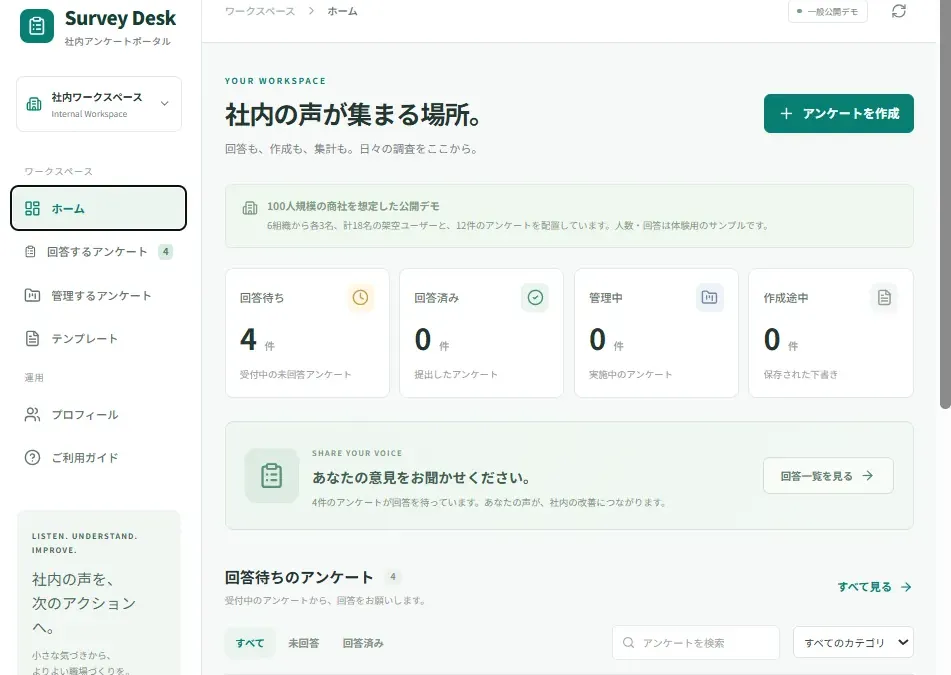
There is a fairly convincing dashboard.
And a fairly convincing survey response screen.
You can actually submit responses, although I have not tested it thoroughly, so there may well be bugs. ChatGPT did tell me it had run 4,000 test cases. That is its claim; I have not independently verified the number or the quality of those tests.
To be fair, my original training project had a few more features, including notifications and support for progressive web apps, or PWAs—web apps that offer some app-like capabilities, such as installation on a device.
Still, based on what I have seen, this version looks good enough that it might have passed the training assignment.
Proper testing would probably expose a fair number of rough edges. But asking the AI to fix those issues seems likely to bring it to a usable standard.
At this level of complexity, though, a few things start to feel questionable. Some of the decisions around user management made me stop and think, “Hang on. Why does it work like that?”
Even so, I think an app of this size could be usable if someone properly tested it and had the problems fixed.
3. A WordPress-Style Blog
You can sign in as a demo user and explore the administration features. The demo account lets you edit posts, but it cannot publish your changes.
The editor is modeled on Gutenberg, WordPress’s block editor. I doubt every feature works properly.
Image uploads and plain text entry work, which is enough for a basic pass. But even deleting a paragraph produced some slightly odd behavior.
There is also a dashboard with something resembling traffic analytics. I have serious doubts about the page-view counting logic, though.
Yes, I know. Just use Google Analytics.
The idea is to change the site’s design by giving instructions to ChatGPT Sites, rather than adjusting templates in the blog’s administration screens.
Given how much freedom ChatGPT Sites offers over the UI, that might actually be a more convenient way to manage the design.
But at this level, questionable details start appearing all over the place. And if you wanted to run a real blog, you would also need to think about database backups.
At which point: yes, just use WordPress.
So, Can You Use It for Business?
For small, low-stakes tools, I can see the appeal. For company-wide business use, I would be very hesitant.
At the time of writing, I could not find a published service-level agreement, or SLA, covering the operational guarantees I would want: availability under load, scaling, database performance, and similar requirements.
These are often called non-functional requirements. They describe how reliably and efficiently a system must operate, rather than which buttons and features it has. An SLA specifies the service commitments a provider makes; it does not necessarily cover every such requirement.
Without clear commitments in those areas, company-wide adoption feels out of the question to me.
A small departmental management tool might be an option. So might an app for an employee club or another activity outside core business operations.
Even at department level, though, it would be difficult to run unless people could accept data loss or an outage with, “Well, these things happen.”
There is a lot of flexibility, so connecting an external database or implementing automatic backups seems possible. But once you start doing that, you need roughly the level of knowledge required to build and deploy a conventional web application yourself.
Where I Would Consider Using It
An attendance app for a club seems like a perfectly reasonable fit.
Another idea that came to mind was a personal wedding invitation app. You could keep adjusting the design to your taste, create a page for each guest, manage photos, and gradually add more features.
Even then, I would still worry about security—especially once the app starts holding guest information or private photos.
The ability to build something easily does not make those concerns disappear.
Would I Enable It Across My Company?
If I were responsible for internal IT, I would be reluctant to make ChatGPT Sites freely available across the company.
If everyone could truly accept full responsibility for what they built, perhaps that would be manageable. But the tool offers so much freedom that someone could easily end up handling confidential information in an inadequately secured application.
I would expect someone to make that mistake eventually.
I can even imagine someone sharing a site with a customer without getting approval first.
My perspective is shaped by working for a systems integrator—a company that builds and integrates IT systems for business customers. That background inevitably affects how I judge these things.
Still, I hope these examples show why I find ChatGPT Sites both incredibly entertaining and difficult to adopt for serious business use.
Where This Kind of Tool Might Go Next
I expect generative AI tools for no-code and low-code development to keep improving.
I am not deeply familiar with every service in this area, but coding assistants already seem to be moving toward handling deployment and maintenance as well. Established low-code and no-code platforms are also incorporating generative AI into their development features.
Over time, I would expect more capable enterprise offerings to emerge.
However, I think there is a trade-off between development freedom and the range of operational guarantees a service can provide.
My impression is that part of ChatGPT Sites’ freedom comes from leaving many of those guarantees outside its stated commitments. Once you start accounting for all the requirements of business use, restrictions are likely to increase.
At the same time, a major part of the value is being able to handle deployment, operations, and maintenance through ChatGPT Sites itself.
If that stops being possible, I would start asking: “How is this any different from building with a coding agent and deploying it myself?”
So my guess is that these tools will make existing low-code and no-code development much more convenient through AI-generated code, rather than completely overturning how software is developed across the industry.
For now, though, it is a lot of fun.
Until next time.
This article is an English translation and adaptation of “ぶっちゃけChatGPT Sitesは業務で使用できるか?デモサイトを公開して検証,” originally published in Japanese on pickerlab.net on October 28, 2026. The structure has been adjusted and brief explanations added for an international audience.


Comments