February 22, 2025
This article summarizes common cybersecurity attack techniques that appear in Japan’s Fundamental Information Technology Engineer Examination (FE) and Applied Information Technology Engineer Examination (AP).
Both examinations are administered by Japan’s Information-technology Promotion Agency (IPA), and security is an important part of their syllabuses.
My goal here is not to turn this into a full cybersecurity textbook. Instead, I want to provide the minimum level of understanding you need to recognize these terms and answer exam questions.
I assume that you already know some basic networking concepts. If terms such as HTTP, IP addresses, DNS, ports, or servers are still unfamiliar, I recommend learning the basics of networking first.
Basic Internet Terminology
HTTP
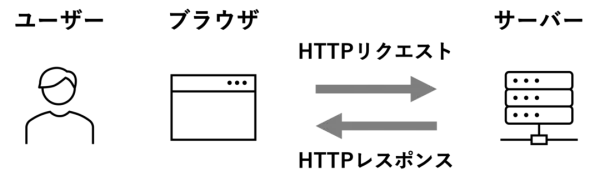
HTTP (HyperText Transfer Protocol) is one of the fundamental protocols used for communication between clients — usually web browsers — and web servers.
When you open a web page, your browser sends an HTTP request such as:
“Please send me this page.”
The server then sends back an HTTP response containing the requested content.
HTTP is not limited to HTML pages. Modern applications use HTTP to exchange HTML, images, videos, JSON data, API requests, and many other types of information.
HTTP dates back to the early 1990s and has become one of the fundamental technologies of the Internet.
However, ordinary HTTP does not encrypt the contents of communication. If someone manages to intercept the traffic, the data may be readable.
That is why modern websites normally use HTTPS, which protects HTTP communication using TLS encryption.
Session
HTTP itself is basically stateless.
In simple terms, each HTTP request is independent, so the server does not automatically remember that two requests came from the same person.
Web applications therefore use the concept of a session to maintain a user’s state across multiple requests.
For example, a session can be used to remember:
- whether you are logged in
- what products are in your shopping cart
- settings temporarily associated with your visit
A web application will often assign the browser a unique session ID.
As long as the browser continues sending that session ID, the server can associate multiple requests with the same session.
Sessions are extremely useful, but they are also important from a security perspective. If an attacker obtains another user’s session ID, they may be able to impersonate that user.
Cookies
A cookie is a small piece of information that a website asks a browser to store.
Cookies can contain things such as:
- session identifiers
- user preferences
- tracking identifiers
- authentication-related information
For example, when you log in to an online account and remain logged in after closing and reopening the browser, cookies are often involved in maintaining that state.
Cookies are convenient, but they also raise security and privacy issues.
Because cookies can be used to identify users or track their behavior, regulations such as the EU’s GDPR and California’s CCPA have made the handling of cookies an important issue for web developers around the world.
Security attributes such as Secure, HttpOnly, and SameSite are also commonly used to reduce the risks associated with authentication cookies.
Malware
Malware
Malware is short for malicious software.
It is a broad term for software intentionally designed to cause harm.
Examples include:
- computer viruses
- worms
- Trojan horses
- ransomware
- spyware
- bot malware
Worm
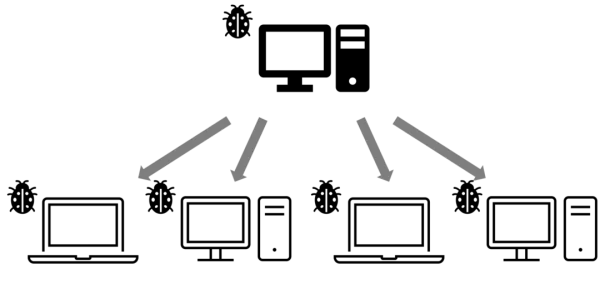
A worm is malware designed to spread from one computer to another, often automatically.
One famous example is Mydoom, which spread rapidly in 2004.
After infecting a computer, variants of Mydoom attempted to distribute themselves to email addresses found on the infected machine. Some variants also turned infected computers into bots that could participate in distributed attacks.
Some worms also install backdoors, allowing an attacker to control the infected computer remotely.
The important difference between a worm and many other types of malware is its ability to propagate itself.
Trojan Horse
A Trojan horse disguises itself as legitimate software or is bundled with something the user wants to install.
Unlike a worm, a Trojan usually does not spread automatically.
Instead, the attacker relies on the user to download or execute it.
Once installed, the malware may secretly:
- steal passwords
- collect credit card information
- monitor the user
- install additional malware
- create a backdoor for remote access
The name comes from the Trojan Horse in Greek mythology: something apparently harmless is used to carry an attacker inside.
Ransomware
Ransomware has become one of the most notorious forms of malware.
The word ransom means money demanded for the release of someone or something.
Ransomware typically encrypts files, locks systems, or otherwise makes data inaccessible and then demands payment for recovery.
Modern ransomware operations may also steal data before encrypting it and threaten to publish the information unless the victim pays. This is often called double extortion.
Ransomware can reach a system in many ways:
- phishing emails
- malicious attachments
- Trojanized software
- compromised accounts
- vulnerabilities in operating systems or applications
- exposed remote-access services
Some ransomware attacks exploit vulnerabilities before a patch becomes widely available. Attacks exploiting previously unknown or newly discovered vulnerabilities are commonly described as zero-day attacks.
Important defenses include:
- keeping operating systems and software updated
- using endpoint security
- limiting administrative privileges
- segmenting networks
- using multi-factor authentication
- maintaining reliable backups
Backups are especially important. They should ideally be isolated from production systems so that ransomware cannot encrypt the backups as well.
Common Attack Techniques
Cross-Site Scripting (XSS)
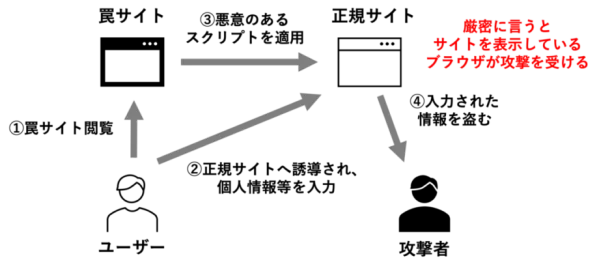
Cross-Site Scripting, usually abbreviated as XSS, is one of the classic web application vulnerabilities.
XSS occurs when an application causes untrusted input to be treated as executable code — usually JavaScript — inside another user’s browser.
Imagine a website where users can post comments.
If the website accepts something resembling:
<script> ... </script>
and inserts it directly into a page without handling it safely, the browser may execute the attacker’s JavaScript.
Because the script runs in the context of the legitimate website, it may be able to perform actions such as:
- modifying the displayed page
- sending requests as the victim
- accessing data available to JavaScript
- displaying fake login forms
- stealing sensitive information under certain conditions
There are several major categories of XSS:
- Stored XSS
- Reflected XSS
- DOM-based XSS
Modern browsers provide many security mechanisms, but the primary responsibility for preventing XSS still lies with the application.
Same-Origin Policy
The Same-Origin Policy is one of the most important security mechanisms built into web browsers.
An origin is basically defined by the combination of:
- protocol
- hostname
- port
For example:

and

are different origins because the port is different.
Likewise:
and
http://example.com
are different origins because the protocol is different.
The Same-Origin Policy prevents JavaScript from one origin from freely reading sensitive information belonging to another origin.
Without this restriction, a malicious website could potentially open your online banking page and directly read information from it.
Cross-origin access can be intentionally allowed using mechanisms such as CORS (Cross-Origin Resource Sharing).
CORS is therefore not a way to disable browser security altogether. It is a controlled mechanism through which a server specifies which other origins are permitted to access certain resources.
Escaping
One of the fundamental defenses against XSS is context-appropriate output escaping.
Characters such as:
< > & " '
may have special meanings in HTML or other programming contexts.
Suppose a user enters:
<script>
into a form.
If the application outputs this directly into HTML, the browser may interpret it as markup.
If < is instead represented as an HTML entity such as:
<
the browser displays the characters as ordinary text rather than interpreting them as an HTML tag.
The important point is that escaping must match the context in which the data is inserted.
HTML, JavaScript, URLs, CSS, and SQL do not all use the same escaping rules.
Cross-Site Request Forgery (CSRF)
Cross-Site Request Forgery, or CSRF, is another web attack whose name is often confused with XSS.
The ideas are different.
With XSS, the attacker manages to execute malicious script in the context of a legitimate website.
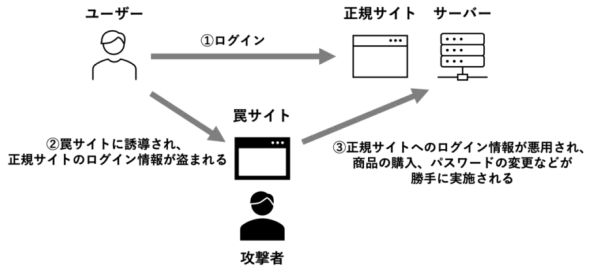
With CSRF, the attacker tricks a user’s browser into sending an unwanted request to a website where that user is already authenticated.
Suppose you are logged in to an online banking website.
If the bank does not properly protect important requests, a malicious website could attempt to cause your browser to send a request such as:
Transfer money to this account.
Your browser may automatically include authentication cookies belonging to the bank.
If the bank cannot determine whether the request was intentionally initiated by you, it may process the request.
Modern defenses include:
- CSRF tokens
- SameSite cookies
- checking Origin or Referer headers where appropriate
- requiring re-authentication for particularly sensitive actions
CSRF Token
A CSRF token is a randomly generated value associated with a legitimate user session or request.
The application places this token in a form or request.
When the user submits the request, the server verifies that the correct token was included.
An attacker’s website normally does not know the token, so it cannot easily construct a valid request.
CSRF tokens are highly effective, but they do not replace XSS prevention.
If an attacker successfully exploits XSS on the same application, they may sometimes be able to obtain or use the CSRF token.
Session Hijacking
Session hijacking occurs when an attacker obtains or abuses another user’s session identifier and uses it to impersonate them.
A session ID might be stolen through:
- malware
- XSS
- insecure storage
- improperly protected cookies
- unencrypted network traffic
- application vulnerabilities
If an attacker obtains a valid authenticated session, they may be able to access the application without knowing the victim’s password.
One related technique is session fixation.
In a session fixation attack, the attacker causes the victim to use a session ID already known to the attacker. After the victim logs in using that session, the attacker attempts to reuse the same identifier.
One common defense is to issue a new session ID after successful authentication.
Applications should also use HTTPS and appropriate cookie attributes such as Secure, HttpOnly, and SameSite.
SQL Injection
Web applications usually store information such as:
- user accounts
- orders
- product information
- transaction data
in databases.
Many relational databases are queried using SQL (Structured Query Language).
An SQL injection vulnerability occurs when untrusted input is incorrectly incorporated into an SQL statement in a way that allows the input to change the structure of the query.
An attacker may then be able to:
- read data
- bypass authentication
- modify data
- delete data
- perform administrative database operations
Older examples of SQL injection often show attackers entering SQL syntax into form fields.
The most important modern defense is parameterized queries, also known as prepared statements.
Instead of constructing a query by joining SQL code and user input together, the application sends the SQL structure and data values separately.
The database therefore knows:
This part is SQL.
and:
This part is only data.
Escaping may sometimes be relevant, but parameterized queries should normally be the first choice.
HTTP Header Injection
HTTP requests and responses contain more than the page or API data itself.
They also contain HTTP headers carrying information such as:
- content types
- cookies
- cache instructions
- authentication information
- redirect locations
An HTTP header injection vulnerability can occur when an application inserts untrusted input into an HTTP header without validating it correctly.
Historically, attackers have abused newline characters such as CR and LF to manipulate the structure of HTTP headers.
This can potentially lead to:
- malicious redirects
- forged cookies
- response splitting
- cache-related attacks
Applications should avoid inserting arbitrary user input into headers and should use framework APIs that safely construct HTTP responses.
Drive-by Download
A drive-by download describes an attack in which malicious software is downloaded or executed when a user visits a compromised or malicious website.
Historically, browser and plugin vulnerabilities could sometimes allow malware to be installed with very little user interaction.
Attackers may also use social engineering to convince users that malicious files are:
- software updates
- PDF documents
- Word documents
- browser extensions
- security tools
Modern browsers have significantly reduced this attack surface, but vulnerabilities in browsers, extensions, operating systems, and document viewers can still be exploited.
Keeping the operating system and browser up to date is therefore an important defense.
OS Command Injection
Operating systems provide commands for manipulating files, processes, networking, and other resources.
On Windows, these commands might be executed through Command Prompt or PowerShell.
On Linux, they are commonly executed through shells such as Bash.
An OS command injection vulnerability occurs when an application passes attacker-controlled data into a system command in an unsafe manner.
This can be extremely dangerous because the attacker may be able to execute commands with the privileges of the vulnerable application.
Potential consequences include:
- reading server files
- modifying data
- installing malware
- creating new accounts
- taking control of the server
The best defense is usually:
Do not invoke a shell with untrusted input.
Whenever possible, use programming-language APIs instead.
If external input must be used, strict allow-list validation should be applied, and the application should run with the minimum privileges necessary.
Directory Traversal
A directory traversal — also called path traversal — vulnerability occurs when an application allows users to manipulate file paths and access files outside an intended directory.
For example:
../
usually means “move to the parent directory.”
If a vulnerable application accepts a filename directly from a URL or form parameter, an attacker may attempt to use combinations of ../ to reach files elsewhere on the server.
Depending on the application, this could expose:
- configuration files
- credentials
- source code
- logs
- operating-system files
A safer design is to avoid accepting arbitrary filesystem paths from users.
Applications can instead:
- map internal IDs to approved files
- use allow-lists
- normalize and validate paths
- restrict filesystem permissions
- ensure the final path remains inside an approved directory
Simply searching the input for the literal string ../ is usually not enough by itself.
Brute-Force Attack
Brute force basically means solving a problem through raw computational effort.
In a password attack, an attacker systematically tries possible password combinations until one succeeds.
Suppose a password can use:
- 10 digits
- 26 uppercase letters
- 26 lowercase letters
- 5 symbols
That gives 67 possible characters for each position.
A four-character password would have:
67⁴ = about 20 million combinations
A five-character password would already have:
67⁵ = about 1.35 billion combinations
This is why password length is extremely important.
However, modern password protection should not depend on length alone.
Common defenses include:
- long passwords or passphrases
- rate limiting
- account lockout or progressive delays
- multi-factor authentication
- secure password hashing
- detection of suspicious login attempts
Dictionary Attack
Attackers often do not start by trying random characters.
People frequently choose predictable passwords.
A dictionary attack therefore tries likely passwords first, such as:
- common words
- names
- dates
- leaked passwords
- predictable combinations of words and numbers
This can dramatically reduce the number of guesses required.
DNS Cache Poisoning
The Domain Name System (DNS) translates domain names such as:
example.com
into IP addresses that computers can use for network communication.
DNS resolvers often store answers temporarily in a cache.
In a DNS cache poisoning attack, the attacker attempts to make a DNS resolver store incorrect information.
For example, the resolver might incorrectly associate:
example.com
with an IP address belonging to the attacker.
Users asking that resolver for the address of example.com could then be directed to a malicious server.
Modern DNS implementations include multiple defenses against classic cache-poisoning techniques, and DNSSEC can provide cryptographic validation for supported DNS data.
DNS manipulation and related techniques are sometimes broadly described as forms of DNS spoofing.
DDoS Attack
A Distributed Denial-of-Service (DDoS) attack attempts to make a server or service unavailable by overwhelming it with traffic or resource-consuming requests from many systems at once.
A traditional DoS attack might originate from a single attacker.
A DDoS attack instead uses many devices.
Those devices may belong to a botnet containing compromised:
- PCs
- servers
- routers
- cameras
- IoT devices
The attacker controls the devices and orders them to attack simultaneously.
In late 2024, for example, Japan Airlines reported a cyberattack that disrupted some systems and contributed to delays and cancellations.
Common DDoS defenses include:
- rate limiting
- traffic filtering
- CDNs
- cloud-based DDoS protection
- Anycast networks
- traffic scrubbing
- scalable infrastructure
Simply increasing server capacity is not necessarily enough. Against a sufficiently large attack, automatically scaling cloud infrastructure can also become extremely expensive.
DDoS vs. Buffer Overflow
A DDoS attack and a buffer overflow attack can both cause systems to crash, but they are fundamentally different.
A DDoS attack primarily aims to exhaust resources or network capacity.
A buffer overflow exploits incorrect memory handling. Depending on the vulnerability, it may allow the attacker not only to crash a program but potentially to execute code or take control of the system.
WAF (Web Application Firewall)
A Web Application Firewall (WAF) monitors HTTP and HTTPS traffic sent to web applications.
It attempts to identify and block suspicious requests based on mechanisms such as:
- signatures
- rules
- request patterns
- reputation information
- behavioral analysis
A WAF may help mitigate attacks such as:
- SQL injection
- XSS
- malicious bots
- some automated attacks
However, a WAF should be considered an additional security layer rather than a replacement for secure application development.
Large-scale DDoS attacks also usually require dedicated network or cloud DDoS protection rather than relying solely on a WAF.
Social Engineering
After discussing all these technical vulnerabilities, we arrive at what may still be one of the most effective attack techniques:
convincing a human to do the attacker’s work.
This is called social engineering.
Instead of breaking encryption or discovering a complicated software vulnerability, an attacker may:
- deceive someone
- impersonate someone
- threaten someone
- bribe someone
- exploit someone’s trust
A classic example is phishing.
An attacker creates a fake login page or sends a fraudulent message and convinces the victim to enter credentials or send money.
Other examples include:
Tailgating
An attacker physically follows an authorized employee into a restricted office or facility.
Shoulder Surfing
An attacker observes passwords or confidential information by watching someone use a computer or smartphone.
Insider Threats
Employees or contractors may intentionally or unintentionally leak information.
For example, an employee preparing to leave a company may copy confidential documents, or an account belonging to an employee may be compromised and used by an attacker.
Traditional corporate networks were often designed around the assumption that devices and users inside the company network could be trusted more than those outside.
Once an attacker entered the internal network, this could allow them to move between systems relatively easily.
That problem is one of the reasons Zero Trust has become important.
Zero Trust Security
Traditional network security often creates a strong boundary between:
- inside the corporate network
- outside the corporate network
Zero Trust takes a different approach.
A simplified version of the philosophy is:
Never trust automatically. Verify explicitly.
Access to applications and data should be evaluated based on factors such as:
- user identity
- device identity
- authentication status
- device security
- location
- requested resource
- risk level
For example, even if an attacker remotely controls an employee’s laptop, that should not automatically give the attacker unrestricted access to every internal system.
Zero Trust aims to limit the damage by continuously enforcing authentication and authorization.
Multi-Factor Authentication (MFA)
Multi-Factor Authentication (MFA) verifies a user’s identity using two or more different categories of authentication factors.
Typical factors include:
Something you know
- password
- PIN
Something you have
- smartphone
- authenticator application
- hardware security key
Something you are
- fingerprint
- face recognition
- other biometric information
Using two passwords is not true multi-factor authentication because both belong to the same category: “something you know.”
MFA is one of the most effective defenses against attacks involving stolen passwords.
IP Spoofing
Network packets contain source and destination IP addresses.
In IP spoofing, an attacker falsifies the source IP address.
This is particularly useful in attacks where the attacker does not need to receive the normal response.
It is commonly associated with techniques such as:
- DDoS attacks
- reflection attacks
- amplification attacks
For ordinary TCP connections, simply spoofing an IP address is more difficult because the communication requires a bidirectional handshake.
Man-in-the-Middle Attack (MITM)
A Man-in-the-Middle (MITM) attack occurs when an attacker secretly positions themselves between two communicating parties.
Instead of communicating directly:
User → Server
the communication effectively becomes:
User → Attacker → Server
The attacker may then attempt to:
- observe traffic
- alter messages
- steal credentials
- manipulate responses
Techniques that may contribute to MITM attacks include:
- ARP spoofing on local networks
- DNS manipulation
- malicious Wi-Fi access points
HTTPS using properly validated TLS certificates is one of the most important protections against network-level interception.
General Security Measures
There are countless attack techniques, and new vulnerabilities continue to appear.
Trying to memorize and individually defend against every possible attack is unrealistic.
The more important goal is to create an environment where many different kinds of attacks become difficult.
Choose Technology Carefully
One of the most important security decisions is simply choosing reliable technology.
Programming languages, libraries, middleware, operating systems, frameworks, and services should ideally be:
- actively maintained
- widely used
- regularly updated
- supported by a healthy development community
Widely used technologies are certainly attacked more often, but they also tend to receive significant security testing and scrutiny.
Developers should also use technologies in their recommended ways.
A common source of security problems is attempting to reimplement functionality that a mature framework or library already provides securely.
Authentication is a good example.
Writing an authentication system from scratch may look simple, but mature frameworks already handle many details that are easy to overlook.
Update Operating Systems, Software, Libraries, and Middleware
Vulnerabilities can arise for many reasons.
Sometimes they are ordinary programming bugs.
Sometimes a design that appeared safe years ago becomes dangerous after new attack techniques are discovered.
Sometimes improvements in computing power make old security assumptions obsolete.
Security vulnerabilities therefore cannot realistically be eliminated forever.
A fundamental principle of modern security is:
When vulnerabilities are discovered, fix them quickly and deploy the update.
Even if your own code is secure, an application can still be compromised through vulnerable dependencies.
That means you need to keep track of:
- operating systems
- application software
- frameworks
- libraries
- middleware
- containers and base images
Automatic updates are useful where appropriate, although production systems should also consider compatibility testing and controlled deployment.
Zero-day attacks can occur before organizations have had time to apply a patch, so security should never depend on patching alone.
Defense in depth is important.
Keep Up with Security Information
Cybersecurity changes constantly.
You do not need to follow every vulnerability published every day, but knowing where to find reliable information is useful.
For people working in Japan, two important organizations are:
IPA — Information-technology Promotion Agency, Japan
IPA publishes cybersecurity advisories, educational materials, vulnerability information, and guidance for Japanese organizations.
JPCERT/CC
JPCERT/CC is Japan’s national Computer Security Incident Response Team coordination center and publishes alerts and technical information about major cybersecurity threats.
If reading security advisories every day sounds exhausting — and it does to me too — following reputable security researchers can also be useful.
Two particularly well-known Japanese researchers are:
Hiroshi Tokumaru
One of Japan’s best-known experts on web application security.
His book Web Application Security: Principles and Practice is widely known among Japanese engineers as the “Tokumaru Book” and is frequently recommended as a practical introduction to web application security.
Hiromitsu Takagi
A prominent Japanese security researcher known for discussing security, privacy, web technology, and problems in digital systems.
Even casually following discussions from experienced security researchers can help you notice when an issue is genuinely serious rather than just another dramatic security headline.
Final Thoughts
For the FE and AP examinations, you do not necessarily need to become a cybersecurity specialist.
What matters first is being able to recognize:
- what the attacker is targeting
- how the attack works
- what kind of damage it causes
- what countermeasure is appropriate
For example:
XSS
→ The attacker’s code runs in the user’s browser.
CSRF
→ The victim’s authenticated browser is tricked into sending an unintended request.
SQL Injection
→ Untrusted input changes a database query.
OS Command Injection
→ Untrusted input reaches an operating-system command.
Directory Traversal
→ An attacker accesses files outside an intended directory.
Session Hijacking
→ An attacker steals or abuses a user’s session.
DDoS
→ Many systems overwhelm a target with traffic.
If you understand those relationships rather than simply memorizing the names, cybersecurity questions become considerably easier.
This article is an English adaptation of the original Japanese article published on pickerLab on February 22, 2025.

Comments